Small Text for Social Media: Instagram, TikTok, Twitter/X & More
Complete guide to using small text on Instagram, TikTok, Twitter/X, and other social platforms. Style comparisons, character limits, bio examples, platform-specific rendering, and tips to maximize engagement.
Social media is a visual-first environment. In a feed where every post, bio, and username looks the same, small text is one of the simplest ways to break the pattern and grab attention. Whether you're an Instagram creator trying to build an aesthetic brand, a TikTok user chasing trends, or simply someone who wants their Twitter/X display name to stand out — Unicode small text works across all major platforms with no app download, no premium subscription, and no technical skills required.
Why Small Text Works on Social Media
Small text isn't just cute — it serves a strategic function on social platforms:
- Visual contrast: In a uniform feed, Unicode characters create visual breaks that make users pause scrolling
- Space efficiency: Superscript and small caps take up less visual space, letting you fit more information in tight character limits
- Brand personality: Small text signals creativity and attention to detail — qualities that translate to more profile visits and follows
- Platform-native: Unlike custom fonts or formatted text, Unicode small text is just regular text. It works in every text field on every platform, no formatting required
The four best styles for social media are Superscript (the #1 all-rounder), Small Caps (professional, editorial feel), Bubble Text (eye-catching circled letters), and Bold (mathematical bold for emphasis).
Instagram: The #1 Platform for Small Text
Instagram is where small text shines brightest. The platform’s clean, text-light design makes tiny Unicode characters pop — and the character limits make efficient use of space crucial.
Instagram Character Limits
| Field | Character Limit | Small Text Works? |
|---|---|---|
| Bio | 150 characters | Yes — best place to use it |
| Name | 30 characters | Yes — great for branding |
| Username | 30 characters | No — standard alphanumeric only |
| Caption | 2,200 characters | Yes — most people won't read past 150 though |
Style Rendering on Instagram
| Style | Rendering Quality | Best Use |
|---|---|---|
| Superscript | Excellent | Bio text, aesthetic descriptions — the safest choice |
| Small Caps | Good | Brand names, acronyms, short headings |
| Bubble Text | Excellent | Eye-catching bio headers, emphasizes key words |
| Bold | Excellent | Strong emphasis on names or call-to-action text |
| Subscript | Partial | Occasional use only — some letters show as boxes |
| Numbers (sup) | Excellent | Dates, follower counts, stats |
Real Instagram Bio Examples
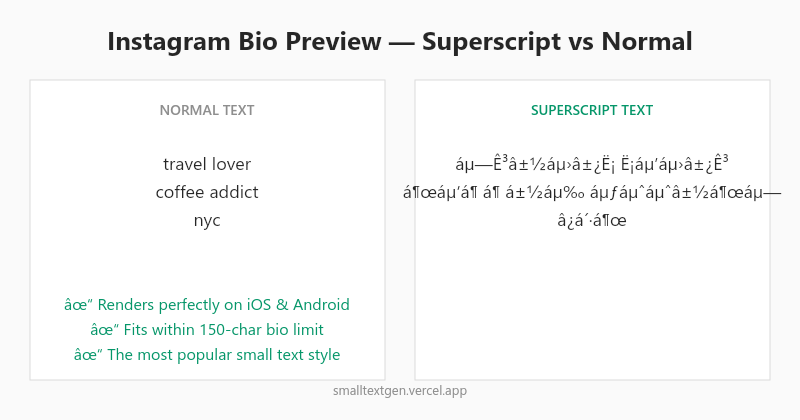
- Aesthetic bio: "travel lover ⋅ coffee addict ⋅ nyc" in superscript creates a clean, minimalist look that feels intentional
- Brand bio: "OFFICIAL ACCOUNT" in small caps functions like a verified badge substitute
- Creator bio: "videographer ⋅ b.1998 ⋅ la" with superscript letters and superscript numbers is cohesive across text and digits
- Business bio: "free shipping on orders $50+" with bold text on "free" and regular text for the rest creates visual hierarchy
Common Instagram Mistakes
- Overusing small text — if your entire bio is in tiny superscript, it becomes hard to read. Mix regular text with small text for contrast and readability
- Using unsupported characters — not every Unicode character renders on Instagram. Test your text before saving
- Ignoring line breaks — Instagram supports line breaks. Use them to create visual sections: a bold header line, a superscript body line, and a regular call-to-action line
TikTok: Small Text as a Trend Strategy
TikTok thrives on trends, and small text has become a quiet but persistent one. The platform's primary differentiator from Instagram is its 80-character bio limit — the tightest in social media — which makes small text a practical tool, not just an aesthetic choice.
TikTok Character Limits
| Field | Character Limit | Notes |
|---|---|---|
| Bio | 80 characters | Tightest limit of any major platform |
| Username | 24 characters | Some Unicode may be rejected |
| Name | 30 characters | Good place for small text branding |
| Video Caption | 4,000 characters | Only ~150 visible before cut |
Small Text Ideas for TikTok
- Bio compression: With only 80 characters, superscript text lets you say more visually. A bio like "ᶜʳᵉᵗᵒʳ ⋅ ᶠᵗⁿᵉˢˢ ⋅ ᵗʳᵛᵉˡ" (creator ⋅ fitness ⋅ travel) communicates three niches compactly
- Comment strategy: Reply to followers with small text comments. In a sea of identical font comments, your reply stands out — increasing the chance the original poster engages back
- Caption hooks: Use superscript for the first 1-2 words of a caption to grab attention in the feed preview
iOS vs Android Rendering
TikTok profiles render slightly differently on iOS and Android. Superscript characters appear slightly smaller on iOS than on Android. Small Caps render more consistently across both platforms. If your audience skews iOS-heavy, test superscript text on an iPhone before committing. If you need maximum cross-platform consistency, Small Caps is the safer choice.
Twitter/X: Small Text for Display Names
Twitter/X supports Unicode small text in display names, bios, and posts. The platform has fewer restrictions than Instagram or TikTok, but small text works best in display names — the first thing people see when you reply or appear in their timeline.
| Field | Small Text Works? | Best Style |
|---|---|---|
| Display Name | Yes | Small Caps or Bold |
| Bio | Yes (160 chars) | Superscript |
| Username (@handle) | No | Standard characters only |
| Posts | Yes | Superscript for emphasis |
A display name like "ᴀʟɪᴄᴇ ᴡʀɪᴛᴇs" (Alice Writes in small caps) visually separates you from the thousands of standard-display-name accounts in any timeline. Combine with superscript numbers for a year or tag: "JOHN ²⁰²⁶".
Platform Comparison: Which Style Where?
| Platform | #1 Style | Runner-up | Avoid |
|---|---|---|---|
| Superscript | Bubble + Bold | Subscript (gaps) | |
| TikTok | Superscript | Small Caps | Subscript |
| Twitter/X | Small Caps | Bold | Subscript |
| YouTube | Superscript | Bold | Subscript |
| Superscript | Numbers | Small Caps (inconsistent) |
Small Text for YouTube & Reddit
YouTube
YouTube supports small text in channel descriptions (5,000-character limit), video descriptions, and community posts. Superscript works well for aesthetic channel descriptions, but YouTube's font on larger screens can make subscript text hard to read. Bold and Bubble Text are more visible at larger sizes and tend to render better in video thumbnails.
Channel name: YouTube restricts channel names to 50 characters and does not support Unicode styling in the name field. Use the channel description area for small text branding instead.
Reddit supports Unicode small text in post titles, comments, and user flairs. Superscript text in comments has become a recognizable visual cue — Redditors use it for humorous asides, corrections, and self-deprecating replies. Small Caps render partially on some subreddits. For consistent rendering, stick to Superscript and Numbers.
Warning: Each subreddit has its own rules about formatting. Some (like r/science or r/AskHistorians) may filter Unicode characters in top-level comments. Test on your target subreddit before using small text in a high-stakes post.
Step-by-Step: Add Small Text to Any Social Profile
- Open the generator: Go to the Small Text Generator on your phone or desktop — no app needed
- Type your text: Enter your bio, name, or caption. All 9 styles appear instantly as you type
- Pick the right style: Use the Style Recommendations table above to choose the style that works best on your target platform. For Instagram and TikTok: Superscript. For Twitter/X: Small Caps or Bold
- Click copy: Tap the Copy button on the style you want
- Paste into your profile: Open your social media app, go to Edit Profile, and paste into the desired field
- Preview and adjust: Check how it looks. If letters appear as boxes, try a different style. If it's hard to read, mix regular text with small text for contrast
Accessibility & SEO Considerations
Before you small-text everything, two important caveats:
- Screen readers: Unicode small text characters may not be interpreted as the letters they visually resemble. If your bio contains critical information (like a website URL or contact method), keep it in regular text so screen readers can parse it correctly
- Search engines: Google and other search engines treat Unicode characters as different from standard letters. "ʰᵉˡˡᵒ" is not the same as "hello" to a search crawler. Don't put keywords you want to rank for in small text format
Try It Now
The best way to see the difference is to try it yourself. Open the Small Text Generator, type your bio or display name, and see all 9 styles — Small Caps, Superscript, Subscript, Numbers, Bubble, Bold, Italic, and Bold Italic — appear instantly. One click to copy, then paste directly into Instagram, TikTok, Twitter/X, or any other social platform. No ads, no sign-up, completely free.